Not quite right?
A different input, another range, galvanic isolation or your own logo: we adapt the module.


Article number PR189
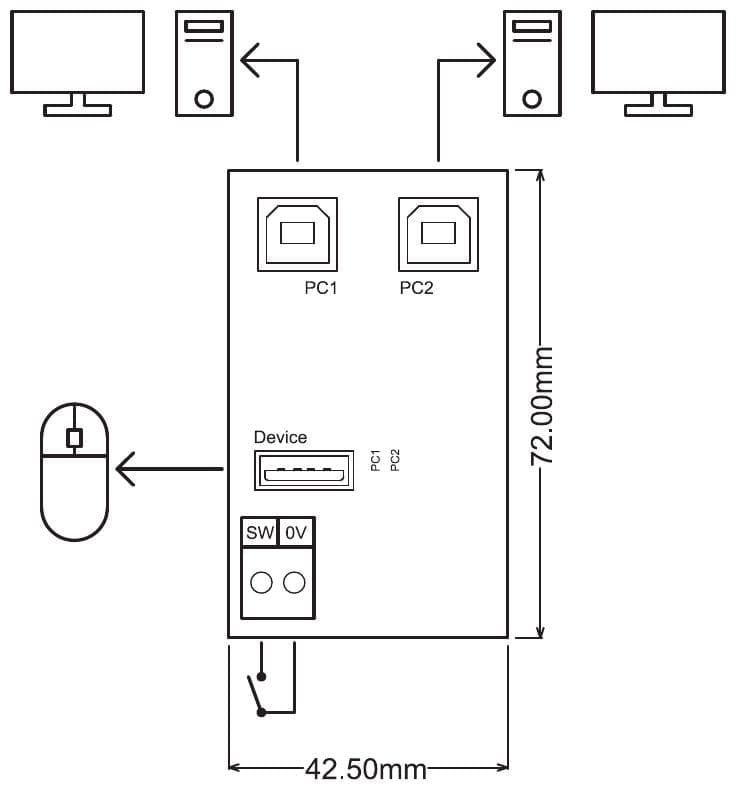
The PR189 lets you use one USB device on two computers without replugging it, for example a mouse, keyboard, printer or licence dongle. A switch on the SW and 0 V terminals selects which computer uses the device. USB port PC1 is galvanically isolated from the PC2 and Device ports to prevent ground loops. The module takes its power from the USB ports; no separate supply is needed.
Price on request
Lead time on request. Not in stock? We will make it.
Orders are placed by email with a purchase order. We supply businesses only.
| Supply | From the USB ports, no separate supply needed |
|---|---|
| Input | Two USB ports for the computers (PC1 and PC2); switch on the SW and 0 V terminals |
| Output | USB port Device for the device, 400 mA max. |
| Isolation | PC1 galvanically isolated from PC2 and Device |
| Dimensions | 45 x 83 mm with DIN rail enclosure, 42.6 x 72 mm without |
| Mounting | DIN rail; enclosure included |
| Terminal | Function |
|---|---|
| Terminal SW | Toggle switch, normally open (NO) |
| Terminal 0V | Toggle switch, common (COM) |
A different input, another range, galvanic isolation or your own logo: we adapt the module.
You speak directly with the developer. Call or message Willem on +31 6 45 77 55 93.
PR189
Enter the quantity. You will receive price and lead time by email. You then order with a purchase order.
Send the article number and quantity via WhatsApp to +31 6 83 66 55 88. Willem replies on working days.
WhatsApp Willem(opens in a new tab)